Space weather lesson plans, taught on the real thing
Three ready-to-teach lessons, each about 45 minutes, with printable student worksheets and answer notes. Built on the live tracker and the six-module course. CME Tracker is listed in NASA's SOHO classroom links.
For the projector
Six pictures that do the explaining. Each opens ready to show.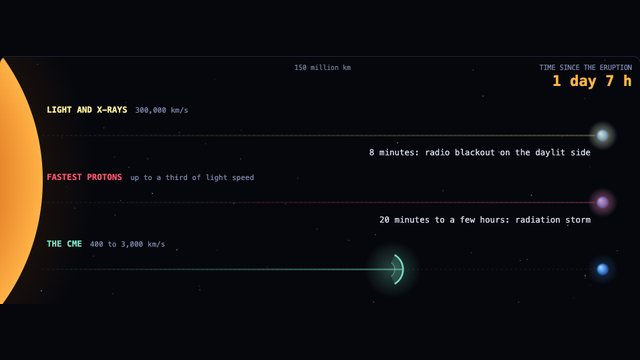 The raceFlare light, protons and the CME reach Earth minutes, hours and days apart. Lesson 1.
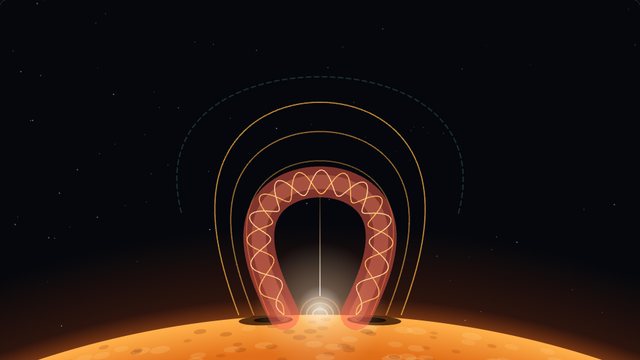 How the Sun makes oneFour steps: energy builds, the rope rises, the snap, the escape. Lesson 1.
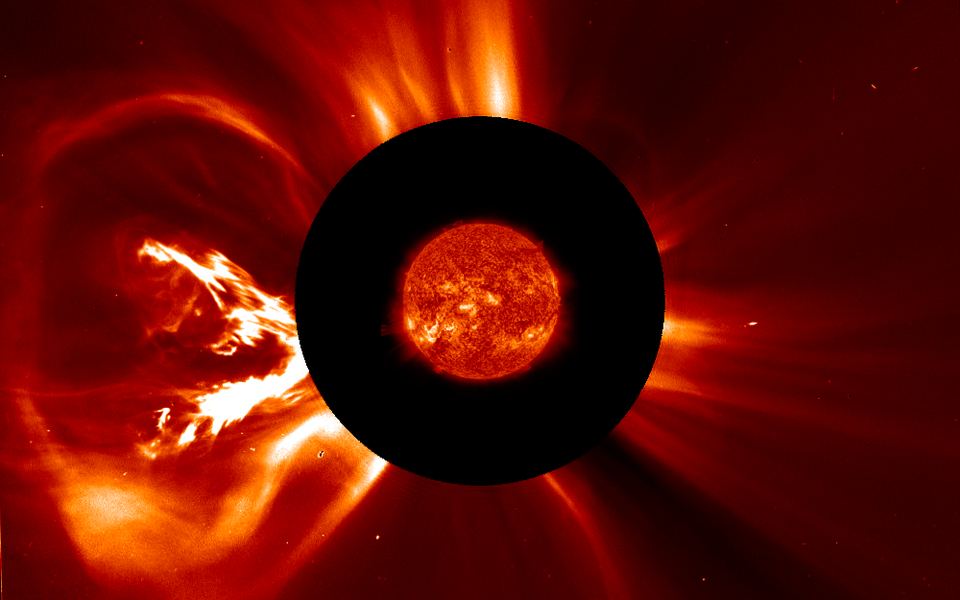 A real one, leavingThe 2012 eruption in 23 real frames. Play it or scrub it. Lesson 1.
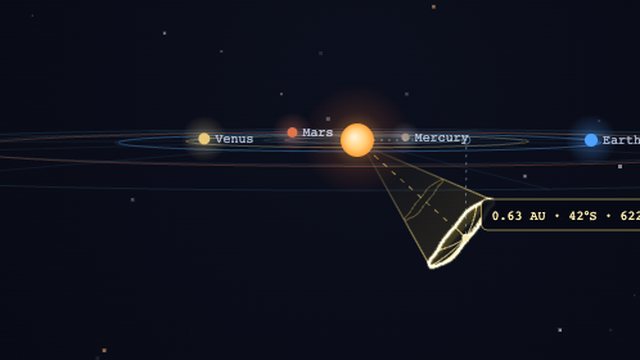 Hit or miss, in 3DTake a class vote from above, then drop the camera to the side. Lesson 2.
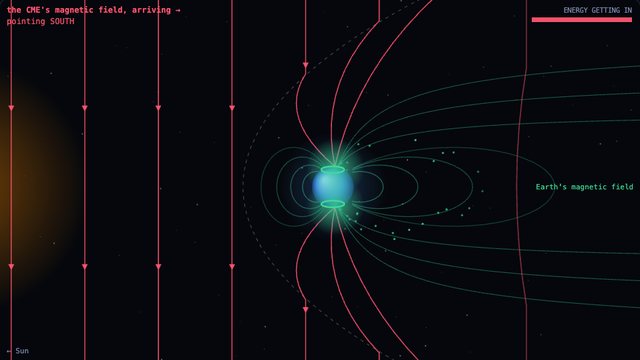 North or southFlip the field and watch the storm switch on and off. Lesson 2.
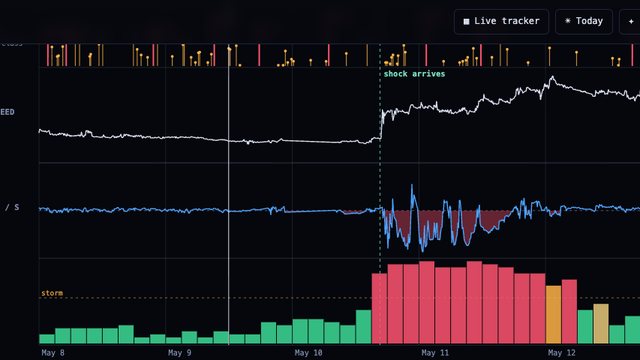 The storm, measuredMay 2024 on one clock: flares, the shock, the field turning south, Kp 9. Lesson 3.
Each link jumps straight to its picture, with the answers already open where a task would normally hide them. Press F11 (or the green button on a Mac) for full screen.
Two optional deep dives extend the course without changing its six modules: When a storm hits Earth (the shield, satellite drag and power grids, a natural follow-up to lesson 3) and The Sun keeps time (the eleven-year cycle in real CME counts).
Lesson plans
Each fits one class periodLesson 1 · The Sun threw something at us
- Warm-up (5 min). Today's Sun on the today page. Count the CMEs. Ask: how many are aimed at us?
- Direct instruction (10 min). CME versus flare: cannonball versus flash. Use the explainer and the anatomy panel in Module 1.
- Guided activity (20 min). Students do Module 1 on their devices: pick a CME on the map, call whether it is aimed at Earth, then read its speed and aim. Then the Gannon replay on the projector; students narrate what they see and ask to scrub.
No devices? Run the whole activity on the projector with one student driving and the class voting "aimed at Earth" or "it will miss" before each answer. It works as well, and the argument about where Earth sits is the point.
- Exit ticket (10 min). "Why does a CME give days of warning but a flare gives none?"
Picture sheet (worksheet 4), if you use it: 1 the Sun, 2 magnetic cloud, 3 sheath, 4 shock, 5 Earth. Light takes 8 minutes, the fastest protons under an hour to a few hours, the CME 1 to 3 days. Panel B: a southward field runs opposite to Earth's where they meet, so the two join and energy gets in.Looking for: a flare is light, so it arrives in about 8 minutes and there is no way to see it coming. A CME is matter and takes one to three days to cross. That travel time is the warning time. Students who say "because we see it launch" have the right idea.
Lesson 2 · Forecasting with honest error bars
- Hook (5 min). Module 4 on the projector: change the solar wind, watch the arrival move by hours.
- Predict, then reveal (20 min). Students run Module 5. They commit each call on the worksheet before the reveal. Collect the calls.
No devices? Read the two scenarios aloud from worksheet 2, have the class commit on paper, then reveal on the projector. The commitment before the reveal is the whole exercise.Answers. Exercise A: 150,000,000 ÷ 2,500 = 60,000 seconds, about 17 hours; the real July 2012 CME crossed to Earth's orbit in under a day. Exercise B: G4 severe, Kp near 8, the biggest storm of that solar cycle to that point. Worksheet question 4, through typical 430 km/s wind: about 78 hours at 500 km/s and about 27 hours at 2,000 km/s, and the fast one arrives having shed roughly half its speed.
- Discussion (15 min). Why was the July 2012 call predictable and the March 2015 call not? Arrival is physics on speed and distance; strength depends on a field direction nobody can see until the last hour.
Looking for: exercise A is arithmetic, distance over speed, so anyone can get near it. Exercise B depended on the magnetic field direction inside the cloud, which is not measurable until the cloud reaches L1 about an hour out. Same launch data, unknowable answer. That is why the site shows a range rather than one number.
- Close (5 min). The model's real scorecard from Module 4: a median of twelve hours, a mean of fifteen, and a third of arrivals off by eighteen hours or more, misses included. Ask: is that a good forecast?
Looking for: there is no single right answer, and the argument is the lesson. Twelve hours is useless for "step outside now" and very useful for "charge the batteries and warn the grid operators". A forecast is judged against the decision it supports.
Lesson 3 · The great storms (jigsaw)
- Setup (5 min). Each group takes one storm from the famous storms pages: Carrington 1859, Québec 1989, Halloween 2003, Gannon 2024, Starlink 2022.
- Group work (20 min). Replay it, read the story, and answer the three questions on worksheet 3: what happened, what broke, what would break today?
- Report back (15 min). Two minutes per group.
Looking for: Carrington set telegraph paper alight, Québec dropped a province's power in 92 seconds, Halloween 2003 rerouted flights and hit satellites, Gannon 2024 stopped GPS-guided tractors mid-field, and Starlink 2022 pulled 38 satellites out of orbit with only a minor storm. The last one is the useful surprise: storm size is not the whole story, timing is.
- Closing question (5 min). What is different about our infrastructure now versus 1859?
Looking for: in 1859 the only vulnerable technology was the telegraph. Now it is power grids, GPS, aviation routes, satellites, pipelines and undersea cables, all of which depend on each other. The same storm today reaches far more of daily life.
Student worksheets
One page each, print what you needEach prints on its own sheet with no answers on it. Use the button on the worksheet: "Print these plans" above gives you the teacher copy only.
Worksheet 1 · The Sun threw something at us
- Open cmetracker.ai/today. How many CMEs launched from the Sun in the last 48 hours?
- How many of them are aimed at Earth?
- Pick any CME on the map and write down what the site tells you.
Speed km/s Direction Aimed at Earth? yes / no - A solar flare and a CME erupt from the Sun at the same moment. Which one reaches Earth first, and roughly how long does each take?
- Most CMEs never hit Earth. Why not?
- Exit ticket. Why does a CME give us days of warning, but a flare gives us none?
Worksheet 2 · Forecasting with honest error bars
- Exercise A. Commit before you look. A CME leaves the Sun at about 2,500 km/s. Earth's orbit is about 150 million km out. Roughly how many hours until it reaches Earth's distance? Show your working.My answer: hours What actually happened:
- Exercise B. Commit before you look. An ordinary CME leaves the Sun at moderate speed and takes about two days to arrive. Nothing about the launch looks unusual. What storm level do you forecast? (circle) G1 G2 G3 G4 or worse
What actually happened: - One of those two was predictable from the launch data and one was not. Which, and why?
- In the storm lab (cmetracker.ai/learn/predict, exercise C), launch a CME at 500 km/s and then at 2,000 km/s through typical solar wind. Write down the transit time for each.
500 km/s: 2,000 km/s:
The faster one loses more speed on the way. Why? - This site's arrival forecasts are off by about 12 hours at the median and 15 on average. Is that a good forecast? Say who it would be good enough for, and who it would not.
Worksheet 3 · The great storms
Our group's storm:
- When did it happen, and how strong was it on the G-scale?
- What actually broke, stopped working, or was damaged?
- If the identical storm hit today, what would break that did not break then?
- Write down one number from the replay or the story that surprised you, and why.
- While the other groups report back, note the one thing you want to remember about each storm.
Worksheet 4 · The picture sheet
- What is inside a CME? Write the name of each numbered part. Word bank: shock · sheath · magnetic cloud · the Sun · Earth
1 2 3
4 5 - The race. One eruption sends three things toward Earth. Write how long each takes. Word bank: 8 minutes · under an hour to a few hours · 1 to 3 days Light Protons CME
- North or south? The lines are the magnetic field inside a CME as it reaches Earth. In A it points north, in B it points south. Circle the one that lets a storm in, and say why.
Classroom setup
Five minutes before the bell- Projector: open the tracker in its clean preset: panels collapsed, just the map. Press F for full screen in most browsers. Keys 1, 2, 3 switch presets.
- Class webpage or smartboard: the free embed widgets put the live map on any page.
- Orientation: the quick start gets a class using the interface fast. The glossary covers the jargon.
- Accuracy questions: the science page publishes the model's real validation, including the misses, if students push on "how do you know?"
- If the Sun is quiet that day: the live map may show nothing headed at Earth, which is normal and worth saying out loud. Every lesson here also works on a stored replay, so no lesson depends on the weather.
Standards
Where this fits- NGSS science and engineering practices: analyzing and interpreting data (Modules 1, 3, 6); developing and using models (Modules 4, 5); evaluating uncertainty and the limits of a model (Modules 4, 5).
- NGSS disciplinary core ideas: ESS1.A the universe and its stars, ESS1.B Earth and the solar system, ESS3.B natural hazards. Cross-cutting: cause and effect, systems and system models, scale and proportion.
- Outside the US: the same lessons map to Earth and space science units on the Sun-Earth system and natural hazards, and to any strand on modelling, measurement uncertainty and evaluating evidence. Tell me which curriculum you teach and I will map it properly.
Tell us how it went
It shapes what gets built nextUsing this in a classroom? The feedback box on the help page reaches the person who built the site directly, and there is an "educator" option on it. Say what grade you teach, what worked and what did not. Teacher feedback is the reason the worksheets on this page exist.
Know when something is happening
Useful for timing a lessonA short email when a significant Earth-directed CME launches, and again when the storm actually arrives. Handy if you want to teach this while the sky is doing something. New classroom material goes out on the same list. No spam, unsubscribe in one click.
Lesson plans and worksheets last updated 5 September 2026. Free to copy, print and adapt for classroom use.